Competitor Buzz Tracker

A command-line example that turns a product and its competitors into a one-page competitive news report (PDF): how many of the articles in the news right now mention each brand, and each brand’s share of the total. You hand the tool a basket — a few searches plus keyword rules — and the model does the rest. It does this by writing the code itself. Driving the sandbox tool, the model writes Python, runs it in the sandbox, and loops — searching the web, deduplicating and classifying the results, fixing its own errors, and re-running — all server-side. You never run any analysis or charting code locally: the script just submits the requests, polls the background responses, and downloads the finished PDF. Every number on the chart is computed, not guessed.
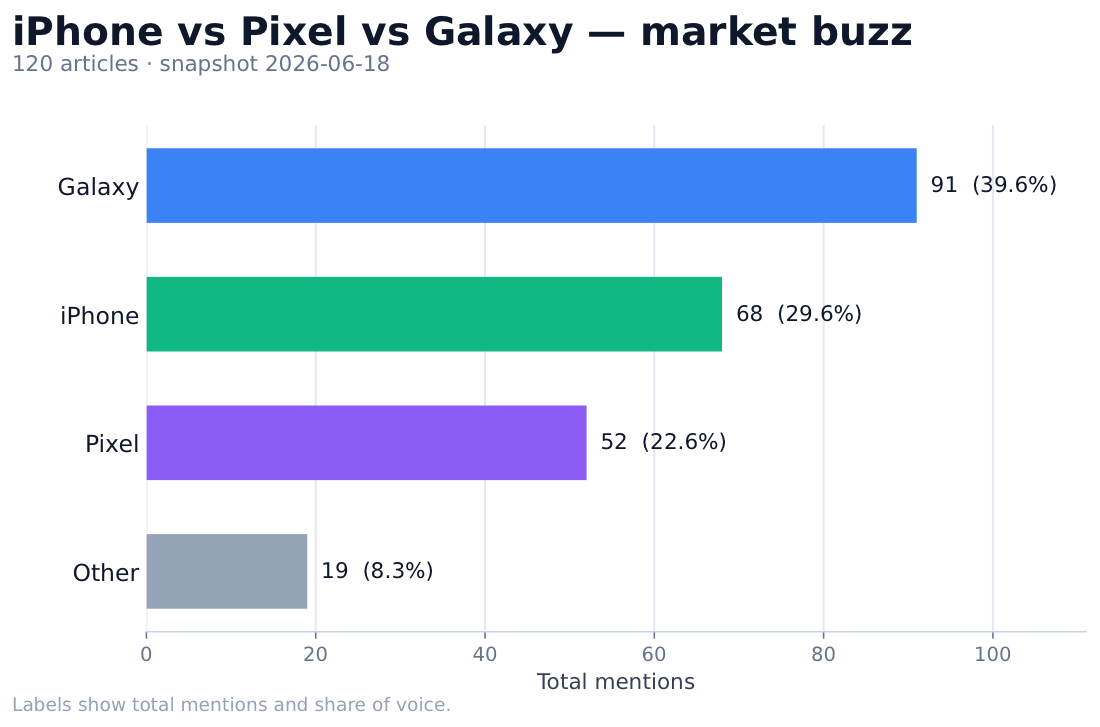
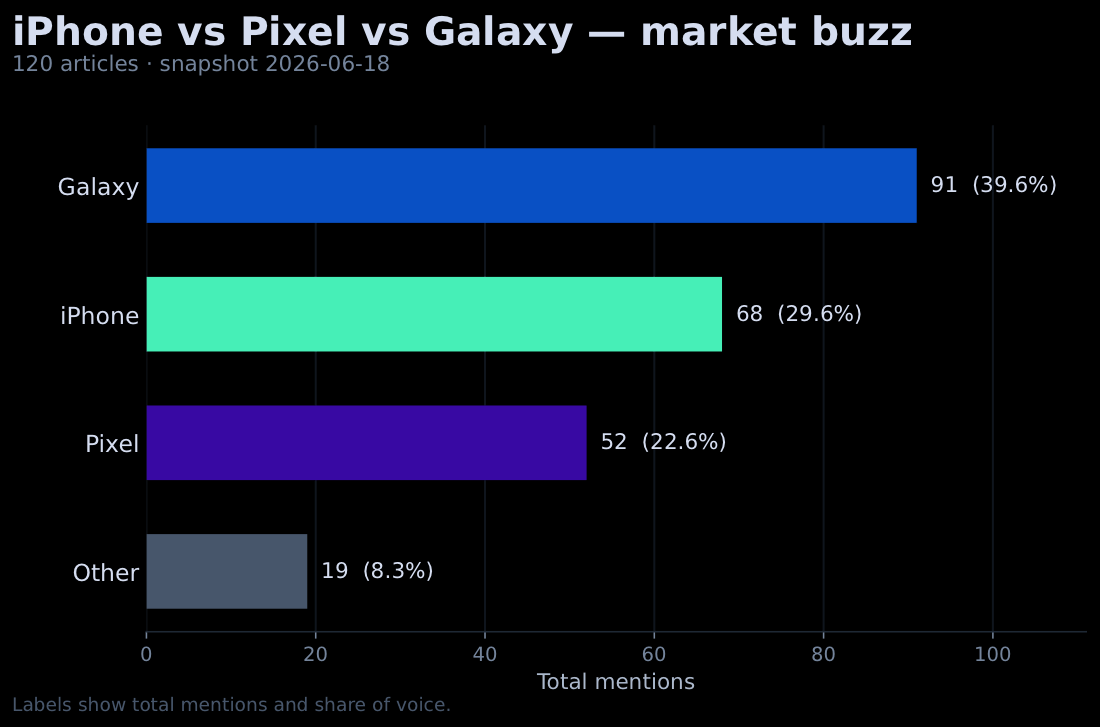
Competitor Buzz Tracker PDF: horizontal bar chart of news mentions for Galaxy, iPhone, Pixel, and Other, each labeled with its total and share of voice.

What the sandbox does here

  • Runs the analysis as code, not from memory. Like a code interpreter, the sandbox lets the model solve a quantitative task by writing and running Python instead of guessing. The mention counts and share-of-voice percentages come from code it actually executed over the search results — so the numbers are real, not plausible-sounding. The script enforces this: it checks the response contains a sandbox_results item and refuses the result otherwise, so the model can’t skip the tool and return invented counts.
  • Searches the web in the same run. The sandbox can reach Perplexity search from inside the run, so the model pulls the articles itself and classifies them in the same request — no separate scraping step, no glue code, no extra tool to wire up.
  • Returns a real file with zero setup on your side. matplotlib and the runtime live in the sandbox; the model renders the chart, shares it with share_file, and you download the .pdf from the response by id. One request in, one file out — nothing to install or host locally. A plain chat completion would only return text.

Without the sandbox

To build the same report yourself, you’d stand up a runtime: a machine with Python and matplotlib, the search and classification code, and somewhere to execute it and capture the file. With the sandbox tool the model writes and runs that code server-side and hands back the finished PDF — nothing to install, host, or keep running — and it adapts the code to whatever the search returns instead of you maintaining a rigid pipeline.

Installation

Keep the project files in the same directory: competitor_buzz_tracker.py, observability.py (imported by the script), requirements.txt, and your basket.yaml.
  1. Install the dependencies — the Perplexity Python SDK, PyYAML (to read the basket config), and Pydantic (for the response schema). They’re pinned in requirements.txt:
requirements.txt
perplexityai==0.38.0
PyYAML==6.0.2
pydantic==2.13.4
pip install -r requirements.txt
  1. Set your Perplexity API key:
export PERPLEXITY_API_KEY="your-api-key-here"
The SDK reads the key from this environment variable.
The sandbox tool is in preview and needs Agent API access — see the Sandbox docs for current availability.

Usage

You describe the job in a small YAML basket: a chart title, the search queries to run, and the keyword rules that classify each result. One article can match several keywords — a story that mentions both Pixel and Galaxy counts for both; one that matches none counts under “Other”. More queries mean broader coverage.
basket.yaml
title: "iPhone vs Pixel vs Galaxy — market buzz"

queries:
  - "smartphone news today"
  - "latest phone news"
  - "new phone launch"
  - "smartphone announcements"
  - "flagship smartphone news"
  - "Android phone news"
  - "new phone releases"
  - "phone review roundup"
  - "best new phones"
  - "upcoming smartphones"
  - "foldable phone news"
  - "budget phone news"
  - "phone camera comparison"
  - "smartphone deals this week"
  - "mobile phone industry news"

keywords:
  - name: iPhone
    regex: "iphone|apple phone"
  - name: Pixel
    regex: "pixel"
  - name: Galaxy
    regex: "galaxy|samsung"
Each keyword’s regex is a single case-insensitive pattern — use | for alternatives (e.g. "galaxy|samsung"). Save it as basket.yaml, then run:
python competitor_buzz_tracker.py --config basket.yaml [--output FILE] [--show-code]
This writes competitor-buzz-<date>_<time>.pdf to the current directory. Add --show-code to also print the Python the agent wrote and ran in the sandbox.

How it works

You describe the job in plain language and hand the model the sandbox tool; from there it writes the Python, runs it, fixes its own errors, and hands back the counts and the chart — you never touch the analysis code yourself. This example splits that work across two chained requests rather than one. Analysis and rendering are different jobs, and splitting them keeps each prompt short, lets you run the mechanical step on a cheaper model (openai/gpt-5.4) and the rendering on the flagship (openai/gpt-5.5), and puts an inspectable checkpoint in the middle. Request 1 (analytics) gets the sandbox tool and a response_format schema. The model searches each query from inside the sandbox, pools the results, deduplicates by URL, regex-matches each article against the keyword rules, and counts mentions per brand plus its share of voice. The schema turns its answer into a typed contract instead of prose:
class Series(BaseModel):
    model_config = ConfigDict(extra="forbid")
    keyword: str
    total: int
    share_of_voice: float


class NewsMentions(BaseModel):
    model_config = ConfigDict(extra="forbid")
    title: str
    articles: int
    series: List[Series]
Request 2 (chart) gets only that JSON and the sandbox tool, then renders the horizontal bar chart to report.pdf and shares it with share_file. There’s no shared memory between the two: the script validates request 1’s JSON against the schema and passes it into request 2, so the intermediate is plain data you can print or unit-test before anything is drawn. Both requests run with background=True and are polled until they finish, because a sandbox run can take a while.

Prompting guidance

You don’t write the analysis code — each request describes its job as a plain prompt, about as long as a chat message, and the model turns that into Python it runs in the sandbox. The analytics request just sends the basket’s queries and keyword rules as its prompt:
Count how often each brand shows up in current phone news.

Search the web for each of these queries, pool the results, and drop duplicate
URLs:
  - smartphone news today
  - latest phone news
  - ...  (the rest of the basket)

Tag each article with these regexes (case-insensitive; an article can match
several; none -> "Other"):
  - iPhone: iphone|apple phone
  - Pixel: pixel
  - Galaxy: galaxy|samsung

Return JSON: title, articles (number of unique articles), and series — for each
brand and "Other", its total and its share_of_voice.
The keyword rules live in the YAML, not in code, so you change what’s tracked by editing the basket — not by touching any Python.
With --show-code, the script prints every sandbox cell the model ran. On the run above the analytics agent took five cells — including one that just inspected a search result to learn its fields — before settling on the code below. Lightly condensed, it’s what it actually executed: search each query, canonicalize and deduplicate URLs, regex-classify each result, count mentions, and print the JSON the schema expects.
import json, re
from urllib.parse import urlsplit, urlunsplit, parse_qsl, urlencode
from collections import Counter
import pplx_sdk  # search interface available inside the sandbox

queries = ["smartphone news today", "latest phone news", ...]

def canon(url):                      # normalize so near-duplicate URLs collapse
    s = urlsplit(url)
    host = s.netloc.lower().removeprefix("www.")
    path = re.sub(r"/+", "/", s.path or "/").rstrip("/") or "/"
    keep = [(k, v) for k, v in parse_qsl(s.query)
            if not k.lower().startswith(("utm_", "fbclid", "gclid"))]
    return urlunsplit((s.scheme or "https", host, path, urlencode(keep), ""))

unique = {}
for q in queries:
    for h in pplx_sdk.search.web(q, limit=10):
        url = getattr(h, "url", None)
        if url:
            unique.setdefault(canon(url), {
                "title": getattr(h, "title", "") or "",
                "summary": getattr(h, "summary", "") or "",
                "url": url,
                "domain": getattr(h, "domain", "") or "",
            })

patterns = {
    "iPhone": re.compile(r"iphone|apple phone", re.I),
    "Pixel": re.compile(r"pixel", re.I),
    "Galaxy": re.compile(r"galaxy|samsung", re.I),
}
counts = Counter()
for h in unique.values():
    text = " ".join(h[k] for k in ("title", "summary", "url", "domain"))
    matched = [b for b, p in patterns.items() if p.search(text)]
    for b in (matched or ["Other"]):
        counts[b] += 1

total = sum(counts.values())
print(json.dumps({                       # the JSON contract the schema expects
    "title": "iPhone vs Pixel vs Galaxy — market buzz",
    "articles": len(unique),
    "series": [
        {"keyword": k, "total": counts[k],
         "share_of_voice": round(100 * counts[k] / total, 1)}
        for k in ["iPhone", "Pixel", "Galaxy", "Other"]
    ],
}))
It’s regular Python you can read and sanity-check — no framework, no hidden state. The model writes fresh code each run, so the exact shape varies between runs. pplx_sdk is the search interface available inside the sandbox.

Full code

The script is one file; cost reporting and the --show-code helper live in a small observability.py beside it (off the critical path, so it’s easy to drop or move into shared tooling later).
#!/usr/bin/env python3
"""
Competitor Buzz Tracker - a basket of searches and keyword rules becomes a
one-page market-buzz chart (PDF) via two Perplexity Agent API requests:
analytics (sandbox searches the web and counts -> JSON) then chart (sandbox ->
report.pdf, shared with share_file). See the README for details.
"""

import argparse
import os
import sys
import time
from datetime import datetime
from typing import Any, List, Optional, Tuple

import yaml
from pydantic import BaseModel, ConfigDict

from perplexity import Perplexity

from observability import print_costs, print_sandbox_code

POLL_INTERVAL_SECONDS = 4
POLL_TIMEOUT_SECONDS = 900
MAX_STEPS = 10

# A cheaper model handles the mechanical search-and-count; the flagship
# writes the chart code.
ANALYTICS_MODEL = "openai/gpt-5.4"
CHART_MODEL = "openai/gpt-5.5"

ANALYTICS_SYSTEM = """Work in a Python sandbox: search the web, then \
classify and count the results with code. Don't estimate the numbers - \
print the final JSON from the sandbox."""


ANALYTICS_TEMPLATE = """Count how often each brand shows up in current \
phone news.

Search the web for each of these queries, pool the results, and drop \
duplicate URLs:
{query_lines}

Tag each article with these regexes (case-insensitive; an article can \
match several; none -> "Other"):
{keyword_lines}

Return JSON: title "{title}", articles (number of unique articles), and \
series - for each brand and "Other", its total and its share_of_voice \
(its total over the sum of all totals, as a percent rounded to one \
decimal)."""

CHART_SYSTEM = """Work in a Python sandbox with matplotlib (Agg \
backend). Build the chart, save it as report.pdf, and share it with \
share_file."""

CHART_TEMPLATE = """Make a horizontal bar chart from this data.

DATA:
{data_json}

One bar per entry in "series", length = its total, sorted longest \
first, labeled with its total and share_of_voice. Title = the "title" \
field; add a subtitle with the "articles" count and \
"snapshot {snapshot_date}". Keep it clean."""


class Series(BaseModel):
    model_config = ConfigDict(extra="forbid")
    keyword: str
    total: int
    share_of_voice: float


class NewsMentions(BaseModel):
    model_config = ConfigDict(extra="forbid")
    title: str
    articles: int
    series: List[Series]


def load_basket(path: str) -> dict:
    with open(path, "r", encoding="utf-8") as fh:
        return yaml.safe_load(fh)


def analytics_prompt(basket: dict) -> str:
    keyword_lines = "\n".join(
        f"  - {kw['name']}: {kw['regex']}" for kw in basket["keywords"]
    )
    return ANALYTICS_TEMPLATE.format(
        title=basket["title"],
        query_lines="\n".join(f"  - {q}" for q in basket["queries"]),
        keyword_lines=keyword_lines,
    )


def chart_prompt(data: NewsMentions, snapshot_date: str) -> str:
    return CHART_TEMPLATE.format(
        data_json=data.model_dump_json(indent=2),
        snapshot_date=snapshot_date,
    )


def final_text(response: Any) -> str:
    chunks: List[str] = []
    for item in getattr(response, "output", None) or []:
        if getattr(item, "type", None) != "message":
            continue
        for block in getattr(item, "content", None) or []:
            if getattr(block, "type", None) == "output_text":
                text = getattr(block, "text", None)
                if text:
                    chunks.append(text)
    return "\n\n".join(chunks)


def ran_sandbox(response: Any) -> bool:
    return any(
        getattr(item, "type", None) == "sandbox_results"
        for item in getattr(response, "output", None) or []
    )


def submit_and_wait(client: Perplexity, **create_kwargs: Any) -> Any:
    response = client.responses.create(background=True, **create_kwargs)
    print(f"Submitted response {response.id}; working...", file=sys.stderr)
    deadline = time.time() + POLL_TIMEOUT_SECONDS
    while response.status in ("queued", "in_progress"):
        if time.time() > deadline:
            raise TimeoutError("Timed out waiting for the response to finish.")
        time.sleep(POLL_INTERVAL_SECONDS)
        response = client.responses.retrieve(response.id)
    if response.status != "completed":
        raise RuntimeError(f"Request ended with status {response.status!r}.")
    return response


def run_analytics(
    client: Perplexity, basket: dict, model: str
) -> Tuple[NewsMentions, Any]:
    response = submit_and_wait(
        client,
        model=model,
        instructions=ANALYTICS_SYSTEM,
        input=analytics_prompt(basket),
        tools=[{"type": "sandbox"}],
        response_format={
            "type": "json_schema",
            "json_schema": {
                "name": "news_mentions",
                "schema": NewsMentions.model_json_schema(),
            },
        },
        max_steps=MAX_STEPS,
    )
    if not ran_sandbox(response):
        raise RuntimeError("Analytics request did not run the sandbox.")
    return NewsMentions.model_validate_json(final_text(response)), response


def run_chart(
    client: Perplexity, data: NewsMentions, snapshot_date: str, model: str
) -> Any:
    return submit_and_wait(
        client,
        model=model,
        instructions=CHART_SYSTEM,
        input=chart_prompt(data, snapshot_date),
        tools=[{"type": "sandbox"}],
        max_steps=MAX_STEPS,
    )


def download_pdf(
    client: Perplexity, response: Any, output: Optional[str]
) -> Optional[str]:
    files = client.responses.files.list(response.id)
    pdf = next(
        (f for f in files.data if f.filename.lower().endswith(".pdf")), None
    )
    if pdf is None:
        names = ", ".join(f.filename for f in files.data) or "(none)"
        print(
            f"No PDF was shared by the sandbox. Files: {names}",
            file=sys.stderr,
        )
        return None

    stamp = datetime.now().strftime("%Y-%m-%d_%H-%M")
    out_path = output or f"competitor-buzz-{stamp}.pdf"
    content = client.responses.files.content(pdf.id, response_id=response.id)
    content.write_to_file(out_path)
    return out_path


def main() -> int:
    parser = argparse.ArgumentParser(
        description=(
            "Generate a one-page market-buzz chart (PDF) from a basket "
            "config, using two Perplexity Agent API requests (analytics, "
            "then chart)."
        )
    )
    parser.add_argument(
        "--config",
        default="basket.yaml",
        help="Path to the basket YAML config (default: basket.yaml).",
    )
    parser.add_argument(
        "--output",
        help=(
            "Output PDF path. Defaults to competitor-buzz-<time>.pdf in the "
            "working directory."
        ),
    )
    parser.add_argument(
        "--show-code",
        action="store_true",
        help="Print the Python the agent wrote and ran in the sandbox.",
    )
    args = parser.parse_args()

    if not os.environ.get("PERPLEXITY_API_KEY"):
        print("Set PERPLEXITY_API_KEY in your environment.", file=sys.stderr)
        return 1

    basket = load_basket(args.config)
    client = Perplexity()

    names = ", ".join(kw["name"] for kw in basket["keywords"])
    snapshot_date = datetime.now().date().isoformat()
    try:
        print(
            f"[1/2] Measuring news buzz for {names}...", file=sys.stderr
        )
        data, analytics_response = run_analytics(
            client, basket, ANALYTICS_MODEL
        )
        parts = [
            f"{s.keyword} {s.total} ({s.share_of_voice}%)"
            for s in data.series
        ]
        print(
            f"      {data.articles} articles - {', '.join(parts)}",
            file=sys.stderr,
        )

        print("[2/2] Rendering the report PDF...", file=sys.stderr)
        chart_response = run_chart(
            client, data, snapshot_date, CHART_MODEL
        )
    except Exception as err:  # noqa: BLE001
        print(f"Error: {err}", file=sys.stderr)
        return 2

    out_path = download_pdf(client, chart_response, args.output)
    if args.show_code:
        print_sandbox_code(analytics_response, "analytics")
        print_sandbox_code(chart_response, "chart")
    print_costs(
        [("Analytics", analytics_response), ("Chart", chart_response)]
    )
    if out_path:
        print(f"\nSaved report to {out_path}", file=sys.stderr)
        return 0
    return 3


if __name__ == "__main__":
    sys.exit(main())

Example Output

A real run — python competitor_buzz_tracker.py --config basket.yaml (results vary with live coverage):
[1/2] Measuring news buzz for iPhone, Pixel, Galaxy...
Submitted response resp_b89831b8-cb87-41ef-8756-1b9447fb19d7; working...
      120 articles - iPhone 68 (29.6%), Pixel 52 (22.6%), Galaxy 91 (39.6%), Other 19 (8.3%)
[2/2] Rendering the report PDF...
Submitted response resp_93c0ab7d-325a-4101-9655-cc4ad40863c3; working...
Analytics cost: 0.2515 USD
Chart cost: 0.0567 USD
Total cost: 0.3083 USD

Saved report to competitor-buzz-2026-06-18_21-12.pdf
The PDF is a horizontal bar chart of mentions per brand, sorted, each bar labeled with its total and share of voice, under a subtitle showing the article count and snapshot <date>. Every count comes from search results the model actually classified with the keyword rules — not from its training data. (Shares are rounded to one decimal, so they may not sum to exactly 100%.)

Limitations

  • Coverage varies. Output depends on live news, so counts differ by topic and over time.
  • sandbox is in preview. Runtime availability and pricing may change.
  • Billing. This makes two Agent API requests, so each run is billed for two sets of model tokens and two sandbox sessions, plus the in-sandbox searches in request 1, at their standard rates.

Resources