

What a real failure looks like
During validation, one model correctly returned429 and wait_then_retry but also cited PDF URLs and RFC 7231. The checker rejected those sources. Another answer correctly recommended verify_outcome for the uncertain payment but cited an /info/ metadata page.
Those were source-contract failures, not unsafe payment recommendations. The original instructions asked for official RFC documents without telling the model which documents and URL formats the application accepted. The instructions in this tutorial make those rules explicit; the checker and expected answers stay unchanged. That is the loop this tutorial teaches: inspect the saved failure, clarify the contract, and rerun the same cases. After the change, all eight requests passed in one live run.
A later run of the same code passed seven of eight. One model answered the 503 case correctly and cited RFC 9110 with an accepted URL, but that request’s search results only contained the RFC’s /info/ and PDF pages, so the checker reported citation_not_in_search_results. The advice was right; the run could not show where the citation came from. Retrieval changes between runs even when the question does not. That is why the runner saves the search results with every answer, and why you should treat any single run as an observation, not a provider benchmark.
How the test works
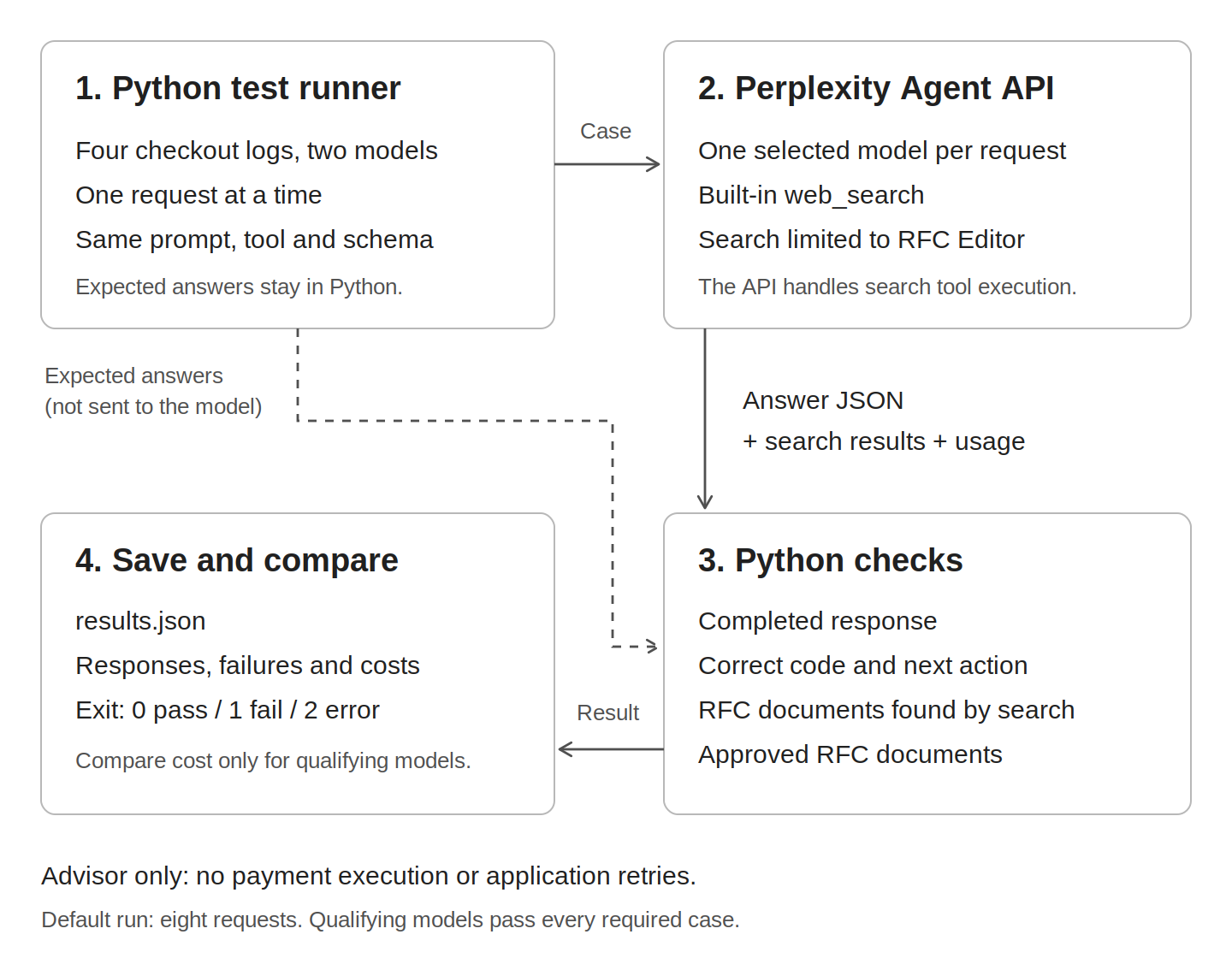
One agent, two models, the same search tool
Perplexity gives you access to models from multiple providers through one API key and request interface (Multi-Provider Model Comparison). Its built-inweb_search runs inside the Agent API request and returns source records you can inspect, with domain filters configured on the tool (Web Search).
- Keep the application unchanged: Use the same instructions, search settings, and JSON output contract for both models.
- Check sources and behavior: Require search results, the observed status and expected next action, and a citation to an approved RFC document returned during that run.
- Compare cost after correctness: Read reported request cost from the response, then compare models that pass the checks. The Agent API exposes
usage.cost.total_costin its response (Agent API Models).
Define four decisions you cannot afford to change
Three checkout logs include an HTTP status. The fourth has none on purpose: your application did not receive a response, so the advisor must not invent a status or assume the payment failed. These are synthetic fixtures, not captured customer incidents.
The action names are your application policy, not fields defined by HTTP.
wait_then_retry means wait before retrying the read-only request; refresh_precondition means retrieve current state and reassess the conditional write; verify_outcome means establish what happened before considering another payment attempt. The script tests selection of these actions, not their execution or the exact wait duration.
Each model receives the log and this shared policy, but not the case’s expected-answer record. The policy states the action and source rules on purpose: this is a small integration test of applying your contract, not a hidden-answer reasoning benchmark. Copying an observed status is easy; selecting the permitted action and preserving uncertainty are the behaviors you want to protect.
The model must return code, next_action, and source_urls. The Agent API supports a JSON schema through response_format; the Python checker independently enforces the three-field contract, including rejection of extra fields (Output Control).
For the payment case, the intended answer has this form. This is an illustrative expected answer, not a measured model response:
- The request completes.
- The response contains built-in search results.
- The returned status code and next action match the expected answers.
- Every cited RFC document appeared in that request’s search results.
- Every cited URL points to an approved RFC document, including the case’s required primary document.
.html, and .txt paths, an optional trailing slash, either RFC Editor hostname, port 443, and section fragments. It rejects other hosts, non-HTTPS URLs, credentials, other ports, query strings, and /info/ metadata pages. Two citations to the same RFC count as duplicates.
This check establishes which document search returned, not whether the model read it or whether a cited section supports the answer. These fixed HTTP rules do not need live search in production; search is included here to test the Agent API’s retrieval-and-answer workflow. Add your own changing documentation and real failure cases before treating this as a production evaluation.
Set up
Use Python 3.12 or later. You need a Perplexity API key with access to the selected models only for live runs, which use your account’s API balance. The offline demo and tests need no key. First confirm your interpreter.python3 --version must report 3.12 or newer. If it reports an older version, install a supported Python and use that interpreter in the commands below (for example, python3.12 -m venv .venv).
Then create a directory and install the pinned SDK:
regression.py, compare_runs.py, test_regression.py, test_compare_runs.py, and test_hardening.py. Each file is built from the code on this page. The first two are the runner and the comparison tool; the three test files prove the checker works without spending anything.
For live runs, set PERPLEXITY_API_KEY through your environment or secret manager. Skip this step for the offline demo and tests. In Bash, you can enter the key without putting its value into shell history:
Build the runner
Everything for one run lives inregression.py: the cases, the instructions, the checker, and the reporting. The file is split into nine parts below. Read the explanation, expand the code, and append each part in order to a file named regression.py. When you finish part 9 you have the complete 264-line script. The finished file is also in Full code at the end of the page.
1. Imports
The script uses the Python standard library plus the Perplexity SDK.argparse reads command-line options. hashlib fingerprints this file so a saved run records which version of the code produced it. Decimal handles money without floating-point rounding. urlsplit breaks a URL into pieces so the checker can inspect the host and path separately. Perplexity is the SDK client that sends requests to the Agent API.
Show the code (15 lines)
Show the code (15 lines)
regression.py (part 1 of 9)
2. Models and cases
MODELS lists the two models the script compares. Both are called through the same Perplexity API key, so you do not need separate provider accounts. The IDs shown are documented Agent API options; swap in any supported model your account can use (Agent API Models).
CASES is the test set. Each case is a small dictionary with five fields. id is a short name that shows up in the console and the saved results. expected is the HTTP status the advisor should report. rfc is the document the answer must cite. action is the next step your application allows. question is the log the model sees. The model never sees expected, rfc, or action; those stay on your side for grading.
The fourth case has no status code because the request timed out before a response came back. The right answer is unknown. An advisor that fills in a code here is making one up.
Show the code (30 lines)
Show the code (30 lines)
regression.py (part 2 of 9)
3. Instructions
INSTRUCTIONS is the system prompt. Both models receive the same text, so the prompt stays constant. A difference in results can still come from retrieval, the model, or run-to-run variation, which is why the saved search results matter.
Read it as a contract with three sections. The first lines set the job and its limits: advise, never execute, always search, and treat retrieved text as evidence rather than commands. The middle names the exact documents and URL shapes your checker will accept. The last lines state your application policy: when to wait and retry, when to refresh a precondition, and when to verify a payment before touching it again.
The source rules are spelled out because the checker enforces them. If you leave a rule out of the prompt and then fail the model for breaking it, you are testing the model’s ability to guess, not its ability to follow your contract. That is the mistake the first version of this tutorial made.
Show the code (19 lines)
Show the code (19 lines)
regression.py (part 3 of 9)
4. Search tool and answer schema
TOOL turns on the Agent API’s built-in web search. search_domain_filter restricts results to rfc-editor.org, and max_results caps how many pages each search returns. You never call a search API yourself. The Agent API runs the search inside the request and returns the results as part of the response (Web Search).
FORMAT is a JSON schema for the answer. It allows exactly three fields: code, next_action, and source_urls. next_action is limited to the three policy names, and additionalProperties: False tells the model not to add anything else. The schema makes answers easy to parse. The checker in part 6 still verifies the shape itself, because a test should not trust the thing it is testing.
Show the code (23 lines)
Show the code (23 lines)
regression.py (part 4 of 9)
5. Recognize an approved RFC URL
rfc_document answers one question: which RFC does this URL point to? It returns a name like rfc9110, or None if the URL is not an approved RFC Editor document.
The function is strict on purpose. The URL has to use HTTPS, point at rfc-editor.org or www.rfc-editor.org, carry no username, password, unusual port, or query string, and have a path like /rfc/rfc9110, /rfc/rfc9110.html, or /rfc/rfc9110.txt. Anything else, including PDF downloads and /info/ pages, returns None. urlsplit can raise on malformed input, so the function catches that and returns None too.
Matching on the document name instead of the exact string means rfc9110.html and rfc9110.txt count as the same source. That is what you want. The rule is about which document was cited, not which file extension.
approved_source is a one-line helper that asks whether a URL points to one specific RFC.
Show the code (19 lines)
Show the code (19 lines)
regression.py (part 5 of 9)
6. The checker
check is the grader. It takes a case, the raw response as a dictionary, and the model’s answer text. It returns a list of reason strings. An empty list means the answer passed. Each string is a separate way the answer failed, so one bad answer can fail for several reasons at once.
It works through the answer in order. First it confirms the response finished with status completed. Then it collects every URL the built-in search returned by walking the response’s output list and picking out items of type search_results. If no search ran, that is a failure by itself, because the instructions require one.
Next it parses the answer as JSON. If the text is not JSON, or the object does not have exactly the three expected fields with the right types, the function stops and returns what it has. There is no point comparing values that do not exist.
The remaining checks compare content. wrong_code and wrong_next_action are direct comparisons with the case. The citation checks use rfc_document: every cited URL must be a recognized RFC document, no RFC may be cited twice, every cited document must have appeared in this request’s search results, every citation must be one of the approved RFCs for this case, and the case’s primary RFC must be present. The search-results check matters most. It confirms that a cited document appeared in the search records for that request. It does not prove the model read the document or relied on it, only that the citation has a receipt.
Show the code (41 lines)
Show the code (41 lines)
regression.py (part 6 of 9)
7. Send one request
reported_cost reads the price of one request from the response’s usage.cost block. It returns the amount as a string of decimal digits, or None if the currency is not USD or the value is missing, negative, or malformed. Strings avoid floating-point rounding when the summary adds them up later.
run_one sends a single request and returns a dictionary describing what happened. client.responses.create is the only Agent API call in the whole script. It passes the model, the shared instructions, the case’s log as input, the search tool, the JSON schema, a cap of five agent steps, and a cap of 4,096 output tokens. Only model changes between providers for a given case.
The runner sends separate model= requests on purpose. A models=[...] request configures fallback, not a comparison, and could hide which provider handled a failing attempt (Multi-Provider Model Comparison).
The order of the lines after the request matters. The function stores the raw response, the answer text, and the cost in the row before it calls check. If the checker throws an exception, the row still holds the evidence, and main writes it at the next checkpoint. An earlier version stored everything in one step and lost the response whenever grading crashed.
If the request itself fails, the except branch records the exception’s class name and its HTTP status if there is one, then marks the reason as execution_error. That reason is kept separate from a wrong answer. A network failure tells you nothing about the model. Either way the row ends with how long the request took and a passed flag that is true only when the reasons list is empty.
Show the code (34 lines)
Show the code (34 lines)
regression.py (part 7 of 9)
8. Summarize a run
summary turns the list of rows into a verdict. It first builds the set of model, case, and repeat combinations the run was supposed to produce and checks that the rows cover exactly that set, with no extras and no gaps. A run that stopped early is complete: false.
For each model it counts passes and adds up reported costs. The cost total is None if any request is missing a cost, because a partial total would look like a real number and mislead you. qualified is true only when the run is complete and every case passed for that model. It tells you the model passed this small suite in this run. Treat it as one input to a release decision, not the decision itself.
The exit code follows the rules a CI job expects: 2 if anything went wrong with running the tests, 1 if everything ran but a check failed, and 0 if all checks passed. Errors outrank failures because you cannot trust a failure verdict from a run that did not finish.
Show the code (28 lines)
Show the code (28 lines)
regression.py (part 8 of 9)
9. Run every case and save the evidence
main brings the parts together. It reads three options: --models, --repeats (1 to 10), and --out. It refuses duplicate model names and stops early if PERPLEXITY_API_KEY is not set, so you find out before spending anything.
It then builds a record of everything that could affect the results: the models, the cases, the instructions, the tool and schema, the limits, the SDK version, and a SHA-256 hash of this file. When you compare two runs later, that record is how you know what changed.
The output file is created with os.O_EXCL, which fails if the file already exists, and with mode 0o600, which keeps it readable by you alone. Model responses can contain text from web pages, so the script treats them as private data.
Inside the loop, checkpoint rewrites the whole record to disk after every request. If you press Ctrl+C while request six is in flight, the five finished results are already on disk. The finally block runs checkpoint one more time as Python unwinds from an exception. The write is not atomic: a full disk, a forced kill, or an interrupt that lands in the middle of a write can leave the file incomplete. The hardening test covers one interrupt timing, not all of them. Model order flips on odd-numbered repeats so the same provider does not always go first. An execution error breaks out of both loops, because retrying blindly would spend your balance on requests that would probably fail the same way.
The last lines print the summary and return its exit code, which SystemExit hands to the shell.
You are not writing a tool-execution loop. The Agent API handles its built-in search during each request; your script inspects the returned search_results and the final answer.
Show the code (55 lines)
Show the code (55 lines)
regression.py (part 9 of 9)
Run your first check
Run the script without arguments:results.json containing the configuration, individual responses, failure reasons, reported costs, and a per-model summary. The console includes each request’s duration and reported cost.
The first request with a new schema can take longer because schema preparation typically adds 10 to 30 seconds before the first token (Output Control). The client uses a 180-second timeout setting to give the request more room; this is not a whole-run deadline or a guarantee that a request will finish.
The output file must not already exist. Use a different name for the next run:
Set PERPLEXITY_API_KEY, return to the environment setup. If you see FileExistsError, choose a new output filename. An execution_error is not a model-quality score: inspect the saved exception type, then check authentication, model access, timeout, connectivity, or local code as appropriate. The runner checkpoints each completed attempt in a private output file, stops after an execution error, saves partial results, and exits with code 2 rather than spending on the remaining requests.
You can select different models or repeat the cases to look for inconsistent behavior:
Read the result
The console prints a result for each log, then a JSON summary. Use these fields to decide whether the run is complete before interpreting its results.
A cheaper answer is not a useful replacement if it fails a required check. Inspect cost only after qualification, and treat the total as spend observed in this run, not an estimate of future unit economics.
There is no promised winner. Four cases are a small integration check, not a provider benchmark, and repeated runs are not guaranteed to produce identical results.
To inspect the complete saved record without adding another dependency, run
python -m json.tool results.json. A successful end-to-end run has eight case results, complete: true, and exit_code: 0; a completed run with an incorrect answer has exit_code: 1. Both outcomes mean the runner worked, but only the first passes the gate.
Diagnose a failure
Openresults.json and find the run’s reasons field. The raw response and returned model identifier are saved alongside it.
wrong_code: The status differs from the expected answer.wrong_next_action: The recommendation breaks your application policy, such as retrying the uncertain payment.search_not_observed: No built-in search results appeared in the response.citation_not_in_search_results: A cited RFC document was not returned during that request, or the URL could not be recognized as an allowed RFC document URL.citation_not_approved: The URL is not one of the approved RFC document paths.primary_reference_missing: The answer omitted the case’s required RFC, even if it cited another allowed document.execution_error: Authentication, transport, or another execution problem prevented a valid comparison. Fix it before interpreting model quality.
Add your first real regression
When your application produces a wrong answer, reduce it to a small case:- Write the question that reproduced the failure.
- Review the correct answer and the document that supports it.
- Add the question, expected value, and approved document to the test set.
- Run the same suite before and after changing the model or instructions.
CASES with a unique id, an expected status string, an action, a primary rfc, and a question. Use "unknown" only when your reviewed case has no observed status. Keep new cases within the three action types, or update both the policy and schema when you introduce another action.
For another domain, change the questions, response schema, approved-source function, and exact-value checks together. A support advisor could check escalation decisions; an integration advisor could check which documented endpoint to use.
Do not change the expected answer just to make a failing model pass. Review corrections to the test separately from changes to the agent.
Compare before and after
The second script,compare_runs.py, reads two saved runs and reports new failures, recoveries, and unchanged results. Keep the models, cases, tools, schema, repetitions, and request limits fixed; change only the instructions for this comparison. The file is split into five parts. Append them in order to compare_runs.py in the same directory as regression.py, or copy the finished file from Full code.
1. Imports
The comparison script imports the runner asr so it can reuse the same cases, instructions, and checker. That is why the two files have to sit in the same directory.
Show the code (9 lines)
Show the code (9 lines)
compare_runs.py (part 1 of 5)
2. Load one run safely
index loads one saved run into a dictionary keyed by model, case, and repeat. Along the way it refuses anything it cannot trust: an empty or duplicated model list, duplicate case IDs, a repeats value that is not a positive integer, two rows with the same key, a row with an execution error, or a row whose passed flag disagrees with its reasons list. If the rows do not cover the expected set exactly, the suite is incomplete and the function raises. A comparison against a broken run would produce confident nonsense, so the script stops instead.
Show the code (25 lines)
Show the code (25 lines)
compare_runs.py (part 2 of 5)
3. Compare two runs
compare takes two records and prints a line for every model, case, and repeat. The label is NEW_FAILURE when a row passed before and fails now, RECOVERED for the reverse, PASS when both pass, and STILL_FAILING when both fail.
Before it compares anything, it checks that the two runs can be compared at all. Each record must be a dictionary with a config and a runs list. Every part of the config except instructions must be identical. If you changed the model list, the cases, the tool, or the schema, you are no longer measuring an instruction change, and the script says so. It also refuses to compare a synthetic demo file with a live record, and it prints a CAUTION line if the SDK version or the code hash differ, because a runner change can move results on its own.
The return value is 1 if there is at least one new failure and 0 otherwise. STILL_FAILING rows do not count. This script tells you whether a change made things worse. The runner’s own exit code tells you whether the suite passes.
Show the code (27 lines)
Show the code (27 lines)
compare_runs.py (part 3 of 5)
4. A demo with a planted failure
demo proves the comparison works without a key or a network call. It builds two fake runs through the real check function. In the before run every case gets the correct answer and a citation to its RFC. In the after run, only the payment case changes: the answer becomes 503 and wait_then_retry, which is the unsafe advice this whole tutorial exists to catch. Both records are stamped evidence: synthetic so they can never be confused with live results. The function writes them to a new directory and then runs compare on them.
Show the code (33 lines)
Show the code (33 lines)
compare_runs.py (part 4 of 5)
5. Command-line entry
main accepts either two file paths or --demo with a new directory name, but not both. Any file, JSON, or structure problem is caught and printed as NOT_COMPARABLE with exit code 2, so a broken input is never mistaken for a clean comparison.
Show the code (21 lines)
Show the code (21 lines)
compare_runs.py (part 5 of 5)
Run the offline demo
First, prove the comparison catches a known failure without a key or a network call:offline-demo directory with before.json and after.json. These files are labeled synthetic and cannot be compared with live records. Use a new directory name when rerunning the demo.
You should see three PASS lines and this one new failure:
1, which is the intended result: the comparison detected the injected regression. This demonstrates the checker and comparison, not a failure observed from a model.
Compare a live instruction change
Capture a baseline before editingINSTRUCTIONS:
1 for any pass-to-fail change, 2 for an execution error or incompatible records, and 0 when there are no new failures. An unchanged failure prints STILL_FAILING and does not count as a new regression, so comparison exit 0 does not mean the candidate passes. Use the runner’s exit code as the acceptance gate.
Rows match by model, case, and repetition number. Repetitions are separate observations, not paired random seeds; a change is a signal to investigate, not proof that the instruction edit caused it. The saved searches help you distinguish retrieval changes from answer changes, and the comparison warns when the SDK or runner code hash changed.
Use it as a small CI gate
In a trusted CI job, injectPERPLEXITY_API_KEY and run:
ci-results.json even on failure and use a clean output path for each run.
Keep live checks manual until you agree on their frequency and budget. Never expose the API key to untrusted fork code.
Prove that unsafe advice fails, without API calls
Three test files check the runner and the comparison tool with hand-written answers and a fake HTTP server. They use only the pinned SDK and the standard library. None of them calls a live model or needs an API key. Save each one in the same directory asregression.py.
test_regression.py
This file feeds the checker hand-written answers and checks that it reacts the right way. example() builds a minimal passing response for the rate-limit case: one search result pointing at RFC 6585 and an answer that cites it. Most tests start from that example and break one thing.
test_unsafe_action_and_invented_status is the test this page is named for. It gives the payment case the correct unknown and verify_outcome answer and confirms it passes. Then it swaps in 503 and wait_then_retry. Both wrong_code and wrong_next_action must appear. A passing test means the checker caught the bad advice, not that it accepted it.
The other checker tests cover empty search results, an empty citation list, text that is not JSON, an extra field in the answer, a response that never completed, and citations to documents outside the approved list. test_rfc_document_variants confirms that .html, .txt, a trailing slash, a section fragment, an uppercase hostname, and port 443 all count as the same RFC, and that citing one RFC twice is flagged. test_url_boundaries_even_when_returned_by_search sends eight bad URLs through the checker, including http://, an /info/ page, a query string, an unusual port, embedded credentials, a lookalike domain, and a newline. Every one must fail even when the fake search returned it. test_unknown_cost and test_gate_and_cost cover missing or NaN costs and the exit-code rules in summary.
The last two tests use the real SDK client with a fake HTTP transport. test_sdk_request_and_parsing_without_network inspects the outgoing request and confirms the model, instructions, tool, schema, and limits are what the runner claims, and that the expected answer is not in it. test_complete_program_pass_failure_and_api_error runs main end to end three times with three repeats each: all answers correct, the unsafe payment answer, and a 401 from the API. It checks the saved file, the reversed model order on the second repeat, and the exit codes 0, 1, and 2.
Show the code (222 lines)
Show the code (222 lines)
test_regression.py
test_compare_runs.py
This file starts every test by running the offline demo into a temporary directory, then compares the two files it produced in different ways. The first test confirms the demo reports exactly one NEW_FAILURE on the payment case and three PASS lines. Comparing a failing run with itself prints STILL_FAILING and exits 0; comparing in the reverse order prints RECOVERED.
The rest of the file checks the guardrails. Changing the repeats, cases, models, tool, or schema between runs raises an error, while changing the instructions is allowed. A synthetic record cannot be compared with a live one. A run with a missing row, a duplicate row, an execution error, or a passed flag that disagrees with its reasons is rejected. A changed code hash prints CAUTION. Malformed records such as a list, None, or an empty dictionary are rejected. The last test drives the command line and confirms that pointing --demo at a directory that already exists returns 2.
Show the code (97 lines)
Show the code (97 lines)
test_compare_runs.py
test_hardening.py
This file checks two promises the runner makes about evidence. The first test replaces check with a function that always raises, then confirms the saved row still holds the response ID and the cost, records ValueError as the error, and is marked as not passed. The second test counts requests through a fake transport, confirms the checkpoint file already holds one result before the second request starts, then raises KeyboardInterrupt in the middle of that second request. After the interrupt, the file must have mode 0o600, exactly one saved run, and exit code 2.
Show the code (70 lines)
Show the code (70 lines)
test_hardening.py
Run the tests
Run all three files with:OK. To run just the unsafe-payment check, use:
Where to take it next
Keep the first version small. Add cases from actual failures before adding judges, dashboards, or automated prompt rewriting. For production, redact sensitive information before storing response records, lock your Python environment, and use a larger held-out test set. This tutorial’s fixed expected answers do not test open-ended research quality, malicious-page resistance, or every supported provider. If you later move the configuration into a saved Profile, pin an explicit version for each comparison rather than usinglatest; request-level parameters can override Profile settings, so record those too (Profiles). Profiles are optional here, and the base runner keeps its configuration in one file.
Validation and limits
Two live runs of this program logic were made on September 18, 2026, with CPython 3.12.13 andperplexityai==0.43.5. The first eight-request run passed all eight checks. A second review run passed seven of eight and two extra uncertain-payment checks; the one failure was a correct 503 answer whose cited RFC URL was not in that request’s search results. All 24 offline tests passed in both. Offline tests prove checker behavior; live runs exercise the providers and search. Neither guarantees every future response will pass, and the difference between the two runs is the reason the gate and the saved evidence exist.
This tutorial tests a small application contract, not whether an LLM understands all HTTP semantics. The checker confirms document identity and exact decisions, not whether a cited section supports an arbitrary explanation. It does not execute payments, test payment systems, or isolate retrieval changes from model changes.
Full code
Each finished file in one piece, one tab per file. The code is identical to the parts above; the walkthrough explains it and this section lets you copy it. Save each tab under its filename in the same directory.Show all five files
Show all five files