

- Date-filtered search.
web_searchaccepts publication-date filters. One request per week returns only pages published that week, with citations. - Effort levels instead of model and prompt choices. Effort levels set how much work the model does.
effort="fast"runs one quick search step, right for a narrow dated question.effort="medium"gives the model more steps to read all the weeks and explain how the story changed. - Code the model writes and runs. A third request adds the
sandboxtool. The model writes Python to count which outlets covered each week, and the API runs it. - Your code does the rest. It splits the range into weeks, runs the fast requests in parallel, and writes the timeline and the chart.
Week by week block the script prints, then the turning points the synthesis named.
One recorded run at 1.5x speed, no cuts. The terminal prints each week as its fast request finishes, then streams the synthesis while the sandbox step runs. The left pane fills from the run's own output, then shows the turning points, the sandbox table, and the chart your code draws.
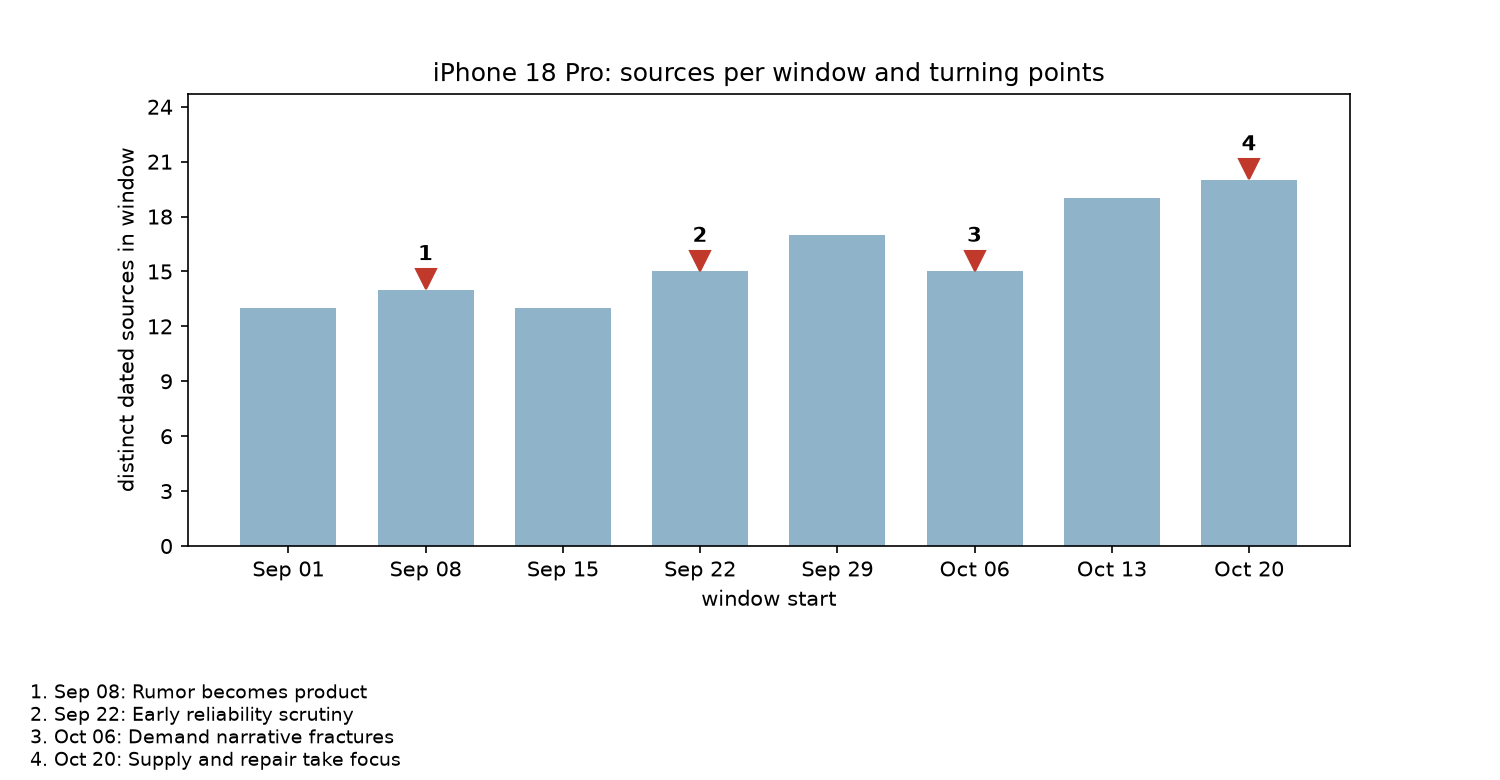
The chart the script wrote. Bars: distinct dated sources per week, capped at the 20 results requested per call. Markers: the weeks the synthesis named as turning points. The model never sees this chart.
--step lets a window be a day or a month.
Filter by date instead of asking in the prompt
Putting the dates in the prompt does not work. The search tool never sees your prompt. It ranks pages by relevance and recency, so a prompt about “the week of September 15” still gets today’s pages back. In the unfiltered probe above, the model had only the 3 pages that happened to fall in that week. With the date filters on, the same window returned 17 pages dated inside it. The date filters decide which pages the model sees. The prompt decides what it does with them.web_search has four date filters, all in MM/DD/YYYY format: search_after_date_filter and search_before_date_filter on the publication date, last_updated_after_filter and last_updated_before_filter on the last update. This recipe uses the publication pair.
Check what you need
- Python 3.12 on macOS or Linux. The shell commands use Unix syntax.
- A Perplexity API key in
PERPLEXITY_API_KEY. Theperplexitylibrary reads it on its own. - About five cents of API credit per eight-window run, three of them for the sandbox session.
fast runs one model step with one search, enough for a narrow dated question. medium runs several steps with its own searches, which the synthesis needs; the coverage step uses medium too and adds the sandbox tool. Each response reports the exact version it ran, such as fast@2026-10-16.0. Pass that string as effort to get the same behavior next time.
Set up the project
Create a directory, a virtual environment, and the dependency file. matplotlib draws the chart and pytest runs the offline tests.timeline.pymakes the window and synthesis requests.coverage.pymakes the sandbox request.report.pyturns everything into Markdown, JSON, and a PNG.compare.pyre-runs one window at several effort levels.
Split the range into windows
split_windows walks from --from to --to in steps of --step days. Both ends of each window are inclusive, and the last window is as short as it needs to be. Each Window formats itself as a filter dictionary, because the API wants MM/DD/YYYY, not ISO dates.
Read Window, mdy, and split_windows (timeline.py)
Read Window, mdy, and split_windows (timeline.py)
Send one fast request per window
Each window gets the same prompt with its dates filled in. The prompt asks for aHeadline: line of at most twelve words, two or three cited sentences, and a plain statement when nothing in range came back. The web_search override carries the filters and raises max_results from the fast effort level’s default of 10 to 20, so a busy week can show more sources than a quiet one.
Read WINDOW_PROMPT and MAX_RESULTS (timeline.py)
Read WINDOW_PROMPT and MAX_RESULTS (timeline.py)
client.responses.create call with effort="fast", the prompt, and the tool override:
Read the request call (timeline.py)
Read the request call (timeline.py)
search_resultslists every page the search returned:id,url,title,date, andlast_updated.messageholds the text, with citation markers like[3]that point at a search result’sid.
collect maps the markers back to their results and counts the distinct URLs with a publication date inside the window. That count is what the chart’s bars show.
Read collect (timeline.py)
Read collect (timeline.py)
Run the windows in parallel
The windows are independent, so they run at the same time throughAsyncPerplexity, with a semaphore capping how many are in flight. The default of 6 fits the 8 QPS of Tier 2 and above on the rate limits page. On Tier 0 or Tier 1, pass --concurrency 1 or --concurrency 3.
The client uses max_retries=0, so the library’s silent retries are off and a 429 shows up in your terminal. create_with_retry retries up to twice and honors Retry-After.
Read create_with_retry and run_window (timeline.py)
Read create_with_retry and run_window (timeline.py)
main ties it together:
- Schedules all the windows with
asyncio.as_completed, so each prints its stats line and headline as it finishes. - Sorts the results, writes a first
timeline.mdwith the per-window sections, writeswindows.jsonwith one record per window, and prints theWeek by weekblock. - Starts the synthesis and the sandbox step together with
asyncio.gather. The synthesis streams to the terminal; the sandbox result prints when both are done.
Read main (timeline.py)
Read main (timeline.py)
Describe how the story changed
A fast request sees one window, so it cannot tell you that late September’s delivery estimates contradict mid-October’s order-cut reports. The synthesis step sends all eight window summaries in onemedium request, because reading them and reconciling them takes more than one model step.
synthesis_input lays out every window as a heading, its summary, and the URLs it cited. SYNTHESIS_PROMPT asks for three Markdown sections and fixes the format of the turning-point lines so your code can parse them back out for the chart.
Read SYNTHESIS_PROMPT and synthesis_input (timeline.py)
Read SYNTHESIS_PROMPT and synthesis_input (timeline.py)
effort="medium" and stream=True. It also gives the synthesis’s own web_search the whole range as a date filter, so a search it runs to check a claim does not pull in today’s coverage. The loop prints each response.output_text.delta as it arrives and reads the final response, with usage and effort version, from the response.completed event.
Read run_synthesis (timeline.py)
Read run_synthesis (timeline.py)
Count outlets per window with the sandbox tool
The synthesis explains the story. It is not the place for arithmetic: ask a model how many distinct outlets covered each week and you get a plausible number, not a counted one. The sandbox tool fixes that. The model writes Python, a container runs it, and the response carries the code and its output in asandbox_results item.
Your code reduces each window’s results to a list of hostnames and sends that as JSON. The prompt tells the model to save the JSON to a file and parse it, not retype it into code.
Read COVERAGE_PROMPT and coverage_input (coverage.py)
Read COVERAGE_PROMPT and coverage_input (coverage.py)
run_coverage adds {"type": "sandbox"} to the medium effort level’s tools, then reads the code and exit code from the sandbox_results item, the table from the message item, and the session cost from usage.tool_calls_details. Your own code could build this table in ten lines. The step is here to show the pattern (send data in, get code and a result back) on numbers you can check against windows.json.
Read run_coverage (coverage.py)
Read run_coverage (coverage.py)
Write the timeline and draw the chart
report.py makes no API calls. write_markdown writes one section per window (headline, the model’s text, the sources it cited), then the synthesis, then the sandbox table. write_windows_json writes the same data as records.
turning_points reads only the text between the “Turning points” heading and the next heading. An earlier version read the whole text, and the Contradictions section, which uses the same - date to date: line shape, showed up on the chart as extra markers.
draw_chart keeps the attribution straight: the bars come from counts your code took from the search results, the markers from turning points the model named. A turning point gets a marker when its start date matches a window start. When the synthesis merges two windows into one span, the marker sits on the span’s first window.
Read turning_points and draw_chart (report.py)
Read turning_points and draw_chart (report.py)
Save the full files
Save these files next torequirements.txt. timeline.py imports from report.py and coverage.py; compare.py imports from timeline.py.
Read timeline.py (full file, 241 lines)
Read timeline.py (full file, 241 lines)
Read report.py (full file, 131 lines)
Read report.py (full file, 131 lines)
Read coverage.py (full file, 76 lines)
Read coverage.py (full file, 76 lines)
Read compare.py (full file, 52 lines)
Read compare.py (full file, 52 lines)
Run the script
--out path is shown as the default out/:
fast@2026-10-16.0 names the exact model, prompt, tools, and limits that produced these results. Pass that string as effort instead of plain fast to make tomorrow’s run behave like today’s.
Read timeline.md from the recorded run (trimmed to three windows, the synthesis, and the sandbox table)
Read timeline.md from the recorded run (trimmed to three windows, the synthesis, and the sandbox table)
Check the result against the sources
Three dated claims from the run, checked against the pages it cited:- September 9 launch. The Sep 08 to Sep 14 window says Apple announced the iPhone 18 Pro on September 9 with a 48-megapixel variable-aperture camera, with preorders from September 12. Apple’s press release, dated September 9, 2026, describes the “48MP Fusion Main camera with variable aperture” and says “Pre-orders begin Saturday, September 12.” Correct.
- October 9 order cut. The Oct 06 to Oct 12 window says Apple asked suppliers to cut October component orders “by at least 15%, citing softer demand and higher memory-chip costs,” and notes Apple did not confirm it. The cited Indian Express report, dated October 9, 2026, carries a Reuters story with “slashed by at least 15% … Nikkei reported” and “Reuters could not immediately verify the report.” Correct, hedge included.
- October 20 supplier announcement. The Oct 20 to Oct 26 window names Qnity Electronics as producing films for the variable-aperture camera and cites “nearly 100 components” from U.S. suppliers. The cited MacRumors article, dated October 20, 2026, says “Delaware-based Qnity Electronics will produce ‘advanced films’ for the variable aperture camera system on the iPhone 18 Pro models.” Correct.
- A fast effort request makes one search and leads with one story. The Sep 22 to Sep 28 window led with the Face ID reports, not the iOS 27.0.1 fix that closed them on September 28.
- The sandbox table counts outlets among the results the search returned, capped at 20 per call. “19 distinct outlets” means the sample was spread across many sites, not that only 19 sites covered it.
Compare effort levels on one window
compare.py sends one window’s prompt and filters at three effort levels. Here is the Sep 22 to Sep 28 window at effort="fast", effort="medium", and effort="high", run at the same moment:
search_results and fetch_url_results items, the closest the response gets to a step count. The medium level ran two searches, saw 30 distinct dated pages, and led with the software fix the fast request missed. For a window where the story turns, that second search is what you pay for. The high level ran four tool calls on a window one search covers, at about 22 times the fast cost.
Five fast runs of this window on the same day led with the Face ID reports four times and the iOS 27.0.1 fix once. Both were in the week. If one window matters on its own, re-run it at the medium level for about twice the cost.
Run the offline tests
test_timeline.py and test_report.py need no network or API key. Fake clients stand in for the API, including one that raises RateLimitError and one that returns a sandbox_results item. The tests cover the window arithmetic, the filter format, citation extraction, the headline split, the turning-point parser, the semaphore cap, the retry path, the Markdown and JSON writers, the sandbox request shape, the chart, and the summary table.
Read test_timeline.py (full file, 189 lines)
Read test_timeline.py (full file, 189 lines)
Read test_report.py (full file, 114 lines)
Read test_report.py (full file, 114 lines)
Keep these limits in mind
- The bounds are inclusive, as observed. Results dated on both filter days came back in every probe. Windows here do not overlap because each starts the day after the last one ends. The reference page does not state inclusivity, so check a boundary date in your own run if you depend on it.
- Undated pages do not come back under a publication-date filter. No result arrived with
date: nullwhen the filters were on; the unfiltered probe returned one. Pages with no publication date in the index will not show up in your windows. last_updatedfilters answer a different question. Every page in the probes had alast_updatedweeks after itsdate, because pages get re-indexed as they change. Use thelast_updatedpair for content that is current, such as documentation or pricing. Use the publication pair for what was said when.- The source count is a capped sample. Each fast effort request asks for 20 results, so the bars top out at 20 and a window with 200 articles looks like one with 20. Read the bars as a density hint and the text for the rest.
- Each window is blind to the others. The request for September 22 knows nothing about October 13. The synthesis is the only place the story gets connected.
- Cost scales with windows. Eight windows cost $0.0141 at the fast effort level and sent 5,753 tokens into the synthesis. A 52-window year is about $0.09 of fast requests and a synthesis input of roughly 50,000 tokens; synthesize quarters first, then the quarters. The sandbox session costs $0.03 whether you have 8 windows or 52.
- The sandbox and date filters do not mix in one request. Keep the filtered searches in their own requests and hand the sandbox step their data, as this recipe does.
- The model only computes what it can read. Data in the prompt reaches the sandbox only if the model writes it to a file. Tell it to save the input before parsing, keep the payload small (the hostnames prompt here is about 3 KB), and read the returned code once per effort version.
- Effort levels are versioned. This page used
fast@2026-10-16.0,medium@2026-10-22.1, andhigh@2026-10-22.0. A new version can change the model, the defaultmax_results, or the citation marker format, which is whycollectaccepts both[3]and[web:3]and the script prints the version strings.
Read next
- Set
--stepto 1 for a day-by-day view of one busy week, or 30 for a year in twelve windows. - Add
search_domain_filterto thefiltersdictionary to restrict each window to a few publications and compare how two outlets covered the same weeks. - Swap in
last_updated_after_filterandlast_updated_before_filterto ask which pages changed that week rather than what was published. - Hand the sandbox step
windows.jsonand ask for the day-by-day spread of publication dates inside each window, or the share of each window’s results from the recurring outlets. - Replace the
printlines inmainwith writes to a database table keyed by topic and window, and run the script on a schedule so the timeline extends itself each week. - Give the synthesis a JSON schema when you want turning points as data rather than Markdown lines.