

pplx-decider-latest with yes/no questions about how the chart is drawn: does the bar axis start above zero, do two value axes make unrelated series look linked, do pie labels add to more than 100%, and six more. The same request asks three questions about a short brand guide: are the data colors on palette, is there a source line, is the title left-aligned. The decision model returns a probability for each question, plus a chart type and an overall score. Your Python decides which checks apply, compares the probabilities to cutoffs, labels the chart, and prints the reason for every finding:
A live run of the finished script on four of the test charts. The left pane shows the chart being checked. The terminal first prints the twelve checks the script sends with every image, then runs the checker and prints every probability the decision model returned. The honest temperature chart at the end starts its axis at 60 and still scores clear, because the script does not apply the truncated-baseline check to line charts.
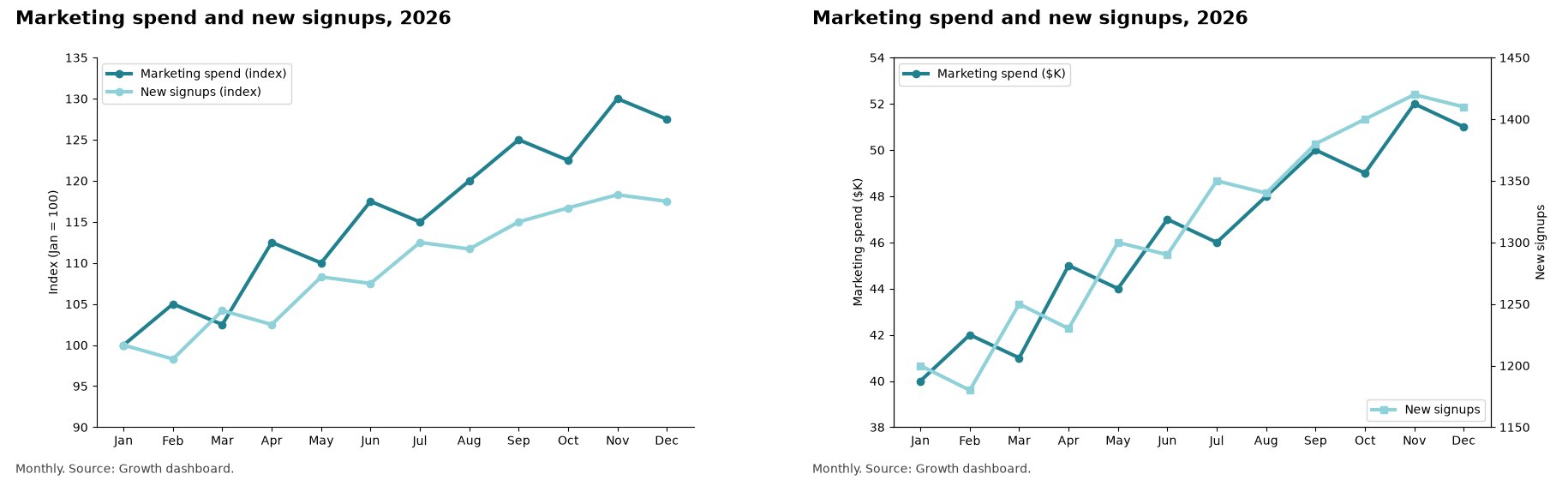
The test pair behind that output. Same twelve months of spend and signups, same title, same source line. On the right, each series gets its own axis and the lines track each other. On the left, both are indexed to January on one axis, and spend grew 27% while signups grew 17%. In the recorded run, dual_axis_mismatch came back at 0.00 for the left chart and 0.99 for the right one.
Why a decision model
A chat model can look at the same chart and write a paragraph about it. You cannot put a cutoff on a paragraph, count how often it is right, or rerun it tomorrow and get the same answer. A decision model returns a calibrated probability for each question you ask, so your code can hold the policy: which checks apply to a bar chart, whereFLAG sits, and what happens between clear and misleading. The policy is readable, testable, and yours to change without touching the model.
Three things follow from that, and this recipe uses all three:
- Numbers you can evaluate. Draw 41 charts with known problems, run them, and the result is a table: caught, passed, false flags. You know how good the checker is before you trust it.
- One request per chart. Fourteen questions about one image go in one request, come back in about half a second, and cost about four thousandths of a cent in input tokens. Output tokens are free. That is a nightly sweep of every chart your company publishes, not a sample.
- Reasons in your words. The model returns probabilities. Your checklist carries the sentence that explains each check, so the output says why a chart misleads in words you approved, not words a model generated.
What you need
- Python 3.11 or newer on macOS or Linux. The shell commands use Unix syntax. On a Mac, check with
python3 --version. Thepython3that ships with Apple’s command line tools can be older; install a newer one withbrew install python@3.12or from python.org. - A Perplexity API key. Every key can call the Decisions API; there is no separate signup.
POST https://api.perplexity.ai/v1/decisions, so the script calls it with httpx, a plain HTTP client. Pillow resizes images. matplotlib draws the test charts in the second half of the page. Nothing else is needed.
Set up
Everything lives in one directory. Checking a chart takes three files:requirements.txt, checklist.py, and chart_check.py. Measuring the checker takes three more, which come later on the page.
requirements.txt
requirements.txt
requirements.txt in it. Then create a virtual environment, install the packages, and export your key.
Install and set the key
Install and set the key
The checklist
checklist.py is plain data, and it is the file you edit to make this checker yours.
CHART_TYPES becomes a choice question, so the response has one chart type and a confidence. Each entry in CHECKS becomes a noul (yes/no) question with written criteria for yes and for no, and the response has one probability per check. Each entry also carries a reason: one sentence, written by you, about what the problem does to a reader. The model never writes it; your code prints it next to the probability, so the output says why a chart misleads, in words you approved. APPLIES_TO lists the chart types each check makes sense for. OVERALL_RUBRIC becomes a score question whose four levels run from faithful to deceptive. EXPERIMENTAL names the checks that are measured but not trusted on their own; there is one, and the results section shows why.
BRAND_GUIDE is a short brand guide in plain text. It goes into the request next to the image, and each entry in BRAND_CHECKS asks whether the chart breaks one of its rules. A brand entry carries a fix instead of a reason. Replace the three rules with your own, but keep each one to something visible in the image: colors, a source line, title placement, a logo.
Write criteria the way you would brief a new analyst. “The first tick is not 0” and “for example 1990, 2000, 2010, 2015” give the model something concrete to look for. Cover the cases where the rule does not apply, too: the title rule says a chart with no title is fine, because without that sentence the model split the difference at about 0.6 on untitled charts. For every question, yes is the problem, so a high probability always means something to fix.
checklist.py
checklist.py
The script, stage by stage
The rest of this section walks throughchart_check.py one piece at a time. Every block below is an exact excerpt of the full file, which follows the excerpts.
Imports and constants
The endpoint, the model, and the four cutoffs live at the top.pplx-decider-latest selects the newest decision model. The cutoffs are the whole policy: a probability at or above FLAG means the problem is present, one between BORDERLINE and FLAG sends the chart to a person, and an overall score at or above REVIEW_SCORE does the same for design even when no single check fires. TYPE_CONFIDENCE sends a chart to review when the model is not sure what kind of chart it is, because the gating in judge depends on that answer.
Imports and constants
Imports and constants
Fitting the image budget
The API reads images in 32 × 32 pixel tiles and accepts up to 2,048 tiles per image. An image over the budget does not return400. The request waits about a minute and then returns 504 (Decisions API docs). So resizing is a correctness step. A full-screen screenshot on a Retina display is often 2880 × 1800 pixels, over 5,000 tiles, and would time out without it.
fit_to_tiles rounds the width and height to the nearest multiple of 32, as the docs describe, and shrinks the image only when it is over budget. It flattens transparent images onto white first, because some exporters store black pixels under a transparent background, and a model would see a black chart. It also converts JPEG and WebP input to PNG, so the request always sends one format. The test charts are 900 × 560, about 500 tiles, and pass through unchanged.
fit_to_tiles()
fit_to_tiles()
One image, fourteen questions
build_request puts the image in state as a data URL, next to a one-line task and the brand guide. state accepts an object, so the image, the task, and the guide arrive as labeled fields. The API never fetches a URL; an http image URL returns 400. Pass context to add a sentence such as the dashboard name. Pass brand=False to leave the guide and its three questions out, which is what the --no-brand flag does for charts that were never meant to follow your guide.
All fourteen questions go in one request: the chart type, nine design checks, three brand rules, and the overall score. They are facets of one review of one image, which is the case where the docs say grouping helps. Grouping also changes the numbers, because each question sees the others. Keep the checklist and its order fixed while you tune cutoffs; the results section has a real chart that moved from 0.61 to 0.45 when the three brand questions joined the request.
yes_no() and build_request()
yes_no() and build_request()
Sending the request
decide posts the body with the client you pass in. On 429 it waits out Retry-After, which can be a number of seconds or an HTTP date; on a 5xx it backs off and retries, up to three times. Anything else that is not 200 raises with the status, the start of the error body, and the x-request-id header, which is what support asks for. By default an organization can send 10 requests per second; this script sends one at a time.
retry_after() and decide()
retry_after() and decide()
From probabilities to two labels
The model answers every design check for every chart, including checks that make no sense for it. A line chart whose axis starts at 60 °F is fine; the same axis on a bar chart is not.judge counts a design check only when the chart type the model returned is listed for it in APPLIES_TO. A high probability on a check that does not apply goes to suppressed, where you can still see it. Brand rules apply to every chart.
Then judge sorts the findings by probability and picks two labels. For design, any flag makes the chart misleading, and a borderline check, a high overall score, or an uncertain chart type makes it review. For brand, any flag makes it off-brand and a borderline rule makes it review; with --no-brand the brand label is skipped. Everything else is clear and conforms. The two labels are independent: a chart can be on-brand and misleading, or honest and off-brand. misleading still means a person should decide; it means the pattern is there with high probability, not that someone meant to deceive.
Verdict, label(), and judge()
Verdict, label(), and judge()
The report and the command line
check_file reads an image, fits it, sends it, and returns a flat record with both labels, every probability, the input tokens, the time, and the request id. explain turns each finding into two parts: the probability with the check’s short label, then the reason or fix from checklist.py. print_record prints the design label with a Why: line per finding and the brand label with a Fix: line per broken rule.
main reads the key from PERPLEXITY_API_KEY, opens one httpx.Client that sends it as a bearer token, checks each file in order, and appends one JSON line per image to results.jsonl. A failure stops the run with a one-line message and writes nothing.
check_file(), explain(), print_record(), and main()
check_file(), explain(), print_record(), and main()
The full file
Save this aschart_check.py. It is the excerpts above in order, nothing else.
Full code - chart_check.py
Full code - chart_check.py
Check your own chart
With the virtual environment active and the key exported, point the script at any chart image. Use--no-brand for a chart that was never meant to follow your brand guide, and pass several files to check them in one run.
Check a chart
Check a chart
pplx-decider-latest. The image checked here was a 1783 × 1114 pixel screenshot of the preview; a smaller download costs fewer tokens and can move the probabilities a little:
Observed output
Observed output
overall is a score question, so it returns a position on the 0 to 3 rubric with a probability for each level.
The response behind it, abbreviated
The response behind it, abbreviated
truncated_baseline applies to a bar chart, that 0.98 is over FLAG, that the label is misleading, and which sentence to print under it.
Measure it
The rest of the page is about knowing how good the checker is. That takes charts with known problems.The test charts
make_charts.py draws 41 PNG files from 22 cases and writes charts/labels.json, the answer key. Each case is an honest chart plus the few settings its planted version changes, so you can read exactly what was planted: revenue_bars changes only ylim, csat_title changes only title, plan_colors changes only colors. The data, the chart kind, the labels, and the source line stay the same, so the only way to tell the two versions apart is the drawing.
Every chart follows the brand guide unless its case plants a brand violation, so the misleading charts are on-brand and the off-brand charts are honest. That keeps the two kinds of check from leaning on each other.
The cases fall into three sets:
- Development (12 pairs): one pair for each of the nine design checks and each of the three brand rules. Tune on these.
- Controls (3 honest charts): a temperature line chart with a 60 to 100 °F axis, a labeled log-scale chart, and a chart with no title. All three are fine designs that a careless checker flags.
- Held out (7 pairs): dark theme, horizontal bars, a donut, an area chart, a pie. Score these once, after everything is frozen.
make_charts.py
make_charts.py
Draw the charts, then check two of them
Draw the charts, then check two of them
Observed output
Observed output
Scoring
evaluate.py runs chart_check.py over a set from charts/labels.json and counts, separately for design and for brand: planted problems caught (the planted check is in flagged or brand_flagged), other charts passed (clear for design, conforms for brand), and false flags (any flag on a chart where nothing of that kind was planted). Checks listed in EXPERIMENTAL get their own row so they cannot inflate or sink the design number. It also prints the score of a checker that sends every chart to review. That checker looks careful and does nothing: it catches no problem and passes no chart. Then it lists every miss.
evaluate.py
evaluate.py
checklist.py and chart_check.py, then score the held-out set once.
Score the development set, then the held-out set
Score the development set, then the held-out set
Results
Measured on 2026-10-19 againstpplx-decider-latest, with the files on this page.
Two changes came from the development set and the controls, and the cutoffs did not change. The first version of the source rule asked for a line that starts with “Source:”. The test charts put the source at the end of a note, and the model gave that rule 0.66 to 0.94 on 8 of 23 conforming charts, a fair reading of the rule as written. The rule now asks for “Source:” anywhere in the note. The first version of the title rule had no answer for a chart with no title, and the model gave it about 0.6 on untitled charts; the rule now says an untitled chart is fine, and the no-title control scores 0.04. After those two edits the files were frozen and the held-out set was scored once.
The design checks and cutoffs come from an earlier version of this checker that was tested on different renderings of the four held-out design cases. Nothing in the design checks was changed in response to them. The three held-out brand cases are new.
Observed output, held-out run
Observed output, held-out run
5353438d-fcf5-4f6e-8734-b85d9046360e, b54231cf-364c-4810-8ed5-4a33649ff178, b0b8f70d-8837-48c3-86f0-6b8a2e3ef9b8, a5f76ad8-bfe6-4c87-b243-2c4bb61adfc1, d23e9405-223a-49fa-b3b9-0d7a7849db6b, bba66963-686b-43e6-8823-143bf9a10c08, e93c58e5-798b-4059-a923-df2a1f7b961a, bc8cb4f2-63fa-4846-8a11-7c60c93c0795, 80ecf435-9364-4ab8-8499-846c3b6d4eb0, d7138a6f-979e-4c68-b2e7-15980545b016, db49cf9a-3b21-4167-89d1-041516554b71, 6097cc2c-a3e3-43d1-92c5-4d2be0d31a76, 48d1178c-2b17-4297-9863-b38ebeeab2cf, 44188ec6-beac-490e-be1c-11e9f0aaeb22. results.jsonl has every request id, probability, and token count from your own runs.
The experimental check. parts_dont_sum asks whether pie labels add to more than 100%. The development pie, whose three labels add to 130%, scored 0.65, just over FLAG. The held-out donut, whose four labels add to 123%, scored 0.02 and was labeled clear. Adding numbers across labels is the weakest check on the list by a wide margin, which is why it is in EXPERIMENTAL and has its own row. Keep it visible, do not act on it alone, and if pie totals matter to you, check the source data in code.
Run to run. Two development runs on 2026-10-19 with the final files returned identical probabilities for all 27 charts. Do not count on that: the Decisions API docs say pplx-decider-latest can move to a newer decision model, and you need to revalidate the cutoffs when it does. Your own charts drawn with the same script can also render slightly differently on another machine, which can move a probability near a cutoff.
Cost and speed. Every test chart was 1,842 input tokens. At $0.02 per million input tokens, with output tokens free, scoring all 41 charts once costs about $0.0015, and a chart costs about $0.00004. Across the 41 requests in the development and held-out runs, the median was 0.45 seconds and 9 in 10 finished within 0.54 seconds. The three slowest took 1.0, 1.5, and 1.8 seconds, so plan for an occasional slow request.
Charts nobody drew for this page
The 41 test charts come from one script, so they show the checks work on clean, single-problem charts. They do not show what happens on charts drawn by other tools. After the held-out run, the frozen files were run with--no-brand on 11 screenshots from public sites: four sample dashboards from Tableau Public, a life expectancy chart from Our World in Data, five examples from the Wikipedia article on misleading graphs (the truncated bar graph and its full-scale version, a 3D pie and its flat version, and a two-bar chart with a cut axis), and a Federal Reserve chart of military spending with two value axes. None had been seen by this version of the checker before.
- Every honest chart was
clearexcept the Tableau stocks dashboard, which went toreviewbecause the model gave its chart type a confidence of 0.42. Dashboards mix chart kinds, and that rule is doing what it is for. - The truncated bar graph was
misleadingat 0.98, its full-scale twinclearat 0.00. The 3D pie wasmisleadingat 1.00, the flat pieclear. The two-bar chart wasmisleadingat 0.95. - The military spending chart, the kind of two-axis chart people argue about, came back at 0.61 for
dual_axis_mismatchwith 11 questions and at 0.45 with the brand guide and its three questions in the same request. Same image, same model,misleadingone way andreviewthe other. That is the grouping effect from the request section, measured, and it is why you freeze the checklist before you trust a cutoff and rescore everything when you add a question.
clear, 1 review), 4 of 4 misleading charts caught, 0 false flags. Label a sample of your own charts and run evaluate.py on them before you trust a cutoff on your dashboards.
Run it on a schedule
The practical shape of this recipe is a sweep, not a one-off. Export every published dashboard as an image each night, runchart_check.py over the folder, and send each misleading or review result to the chart’s owner with its Why: lines. The dashboards above cost about 2,500 input tokens each, so a chart costs about $0.00005; at the default 10 requests per second, that is 36,000 charts an hour for under $2. A GitHub Action that checks every PNG a notebook produces on a pull request is the same loop with a different trigger. results.jsonl already has everything a report needs: both labels, every probability, and a request id per chart.
Run the tests
The tests cover the request shape with and without the brand guide, the tile budget, transparent images, chart-type gating, the review rules including an uncertain chart type, brand and design labels staying separate, the printed reasons, the429 retry with both forms of Retry-After, and the scoring with an experimental check. They make no network calls and need no key.
test_chart_check.py
test_chart_check.py
Run the tests
Run the tests
What this is not
- It does not check the data. A chart can start at zero, label every axis, and still plot the wrong numbers.
- It cannot see what was left out. A chart that starts the date range at a convenient low point looks fine as an image. That is a question about the data behind the chart, not the pixels.
- It does not judge intent. A bar chart of body temperature with an axis starting at 95 °F is a defensible choice.
misleadingmeans a pattern is present; a person decides what to do about it. - The reasons are yours, not the model’s. Each
Why:andFix:line is the sentence you wrote inchecklist.pyfor that check. It explains the check, not this particular chart. - It does not check rendering. Clipped text, overlapping cards, a button pushed off screen, or a blank page are defects in how a page was drawn, and they need different questions than the ones here. This recipe assumes the chart rendered as its author intended and asks whether that rendering tells the truth.
- It does not replace a brand review. Three rules about colors, a source line, and a title cover what is easy to see in an image. Fonts, logo use, and tone of voice need a person. The color rule catches blue where teal belongs, not a teal two shades off; an exact palette check is a pixel count you can do in Pillow without a model.
Adapt it
- Your brand guide. Replace
BRAND_GUIDEandBRAND_CHECKSwith your rules, add an honest/off-brand pair for each tomake_charts.py, and rerun the development set. Describe colors by name as well as by look (“dark teal, not blue”), because the model reads the image, not your hex codes. Say what happens when a rule does not apply, as the title rule does for untitled charts. - Your design checks. Add an entry to
CHECKSand toAPPLIES_TO, add a pair tomake_charts.py, and rerun. Adding a question changes the numbers for the others, so rescore everything. - Your cutoffs. Label a few hundred of your own charts, run
evaluate.pyon them, and moveFLAGandBORDERLINE. Leave margin around where your charts cluster; a cutoff on top of a cluster turns small movement into a different label. - Context. Pass
contexttobuild_request, for example “Quarterly board deck, finance team”, to give the model the setting the chart appears in. - The other decision model. Set
MODEL = "pplx-decider-flash-latest"to try the smaller model. The docs recommend one question per request for Flash by default, and this recipe groups fourteen, so measure it on your own labeled charts first. The results on this page are forpplx-decider-latestonly.
Troubleshooting
Every Decisions API error prints as<file>: Decisions API failed: <status> <error body> (x-request-id <id>).
Set PERPLEXITY_API_KEY first.means the key is not exported in this terminal. Run theexportline again.400withInvalid modelmeansMODELis not a name the API accepts. Usepplx-decider-latest.401is a missing or invalid key.504after about a minute usually means an image over the tile budget.fit_to_tilesprevents that for files sent throughcheck_file; if you build requests another way, resize first.ModuleNotFoundError: No module named 'checklist'meanschecklist.pyis not in the directory you run from. Save it next tochart_check.py, and run bothchart_check.pyandevaluate.pyfrom that directory.No matching distribution found for matplotlib==3.11.2during install means the virtual environment uses Python older than 3.11. Remove.venvand create it again with a newer Python, for examplepython3.12 -m venv .venv.